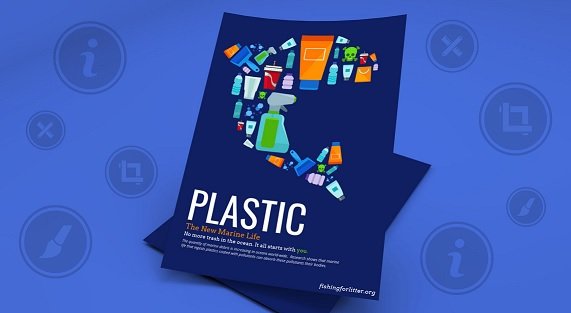
In today’s fast-paced visual world, posters remain a powerful tool for communication. Whether it’s promoting an event, advertising a product, educating an audience, or conveying social messages,creating an poster that grabs attention and communicates effectively is a valuable skill. This article explores everything you need to know about poster creation—from concept to design, layout, and distribution.
What Is a Poster?
A poster is a printed or digital piece of visual communication designed to attract attention and convey information quickly. It typically combines text, images, and graphic elements and is displayed in public or online spaces. Posters can be used for:
- Advertising (products, services, events)
- Informational purposes (academic, educational)
- Awareness campaigns (social, health, political)
- Artistic expression (movie, music, or conceptual art posters)
Purpose of Creating a Poster
Before diving into the design process, it’s essential to understand why you’re creating a poster. The purpose dictates the style, tone, content, and layout of your poster. Ask yourself:
- Who is the target audience?
- What message do I want to communicate?
- What action do I want the viewer to take?
- Where will the poster be displayed?
For example, a concert poster should be bold and energetic, while a medical awareness poster should be clean, clear, and informative.
Steps to Creating a Poster
1. Define the Objective
Start by clarifying the goal of the poster. Is it to inform, persuade, entertain, or advertise? Your objective will guide every aspect of the design, including color choices, fonts, imagery, and tone of voice.
2. Know Your Audience
Tailoring your poster to your target audience increases its effectiveness. Consider factors such as age, interests, cultural background, and level of knowledge on the topic.
3. Gather Content
The next step is to compile all the necessary content, including:
- Headline: A catchy title or question that grabs attention
- Subheadings: Supporting lines to explain or expand the headline
- Body text: Essential information—dates, locations, details
- Images or graphics: Visuals to support or enhance the message
- Contact or call-to-action (CTA): What you want viewers to do next (e.g., visit a website, buy tickets)
4. Choose a Poster Size and Format
Depending on where the poster will be displayed, you need to decide on the size and orientation:
- Standard sizes: A3 (11.7×16.5”), A2 (16.5×23.4”), A1 (23.4×33.1”), A0 (33.1×46.8”)
- Digital formats: 1080x1920px for stories, 1200x628px for social media posts, etc.
Orientation can be portrait or landscape depending on the design and space availability.
Design Principles for Effective Poster Creation
Creating a poster involves combining design elements to communicate clearly and attractively. Here are key principles:
1. Hierarchy
Arrange elements based on importance. The headline should be the most prominent, followed by subheadings and body text. This guides the viewer’s eye through the content.
2. Balance and Alignment
Use symmetry or asymmetry to achieve visual balance. Proper alignment makes the layout look organized and professional.
3. Contrast
Contrast between colors, fonts, and shapes helps elements stand out. For example, a light font on a dark background or a bold image beside minimal text.
4. Typography
Choose fonts that are readable and appropriate for the message. Limit yourself to 2–3 fonts. Use variations in size, weight, and style for emphasis and variety.
5. White Space
Don’t overcrowd your poster. White space (empty areas) helps avoid visual clutter and allows important elements to breathe.
6. Color Scheme
Color influences mood and visibility. Use a consistent and harmonious color palette. Bright colors attract attention, while muted tones convey seriousness or professionalism.
Tools for Creating a Poster
Whether you’re a beginner or a seasoned designer, many tools can help you create professional posters:
Online Design Tools (User-Friendly)
- Canva – Offers thousands of templates and an intuitive drag-and-drop editor.
- Crello (now VistaCreate) – Ideal for animated and static posters.
- Adobe Express – Easy to use with powerful AI-based design tools.
Professional Graphic Design Software
- Adobe Photoshop – Best for image-heavy, detailed poster designs.
- Adobe Illustrator – Ideal for vector-based poster design.
- CorelDRAW – Great for layout-heavy posters.
- Affinity Designer – A budget-friendly alternative to Adobe tools.
Mobile Apps
- Canva Mobile App
- Over by GoDaddy
- Poster Maker
These are great for quick edits or social media posters on the go.
Tips for Creating an Eye-Catching Poster
- Start with a strong headline – Make it bold, short, and attention-grabbing.
- Use high-quality images – Blurry or pixelated visuals ruin credibility.
- Stick to one central message – Don’t overload with too many ideas.
- Make your CTA obvious – Tell viewers exactly what to do.
- Test readability from a distance – A poster must be readable from at least 3–5 feet away.
- Use grids and guides – They help maintain alignment and structure.
- Print a sample before mass production – Always check colors, spacing, and layout.
Common Mistakes to Avoid
- Overloading with text – Posters are for skimming, not reading essays.
- Using too many fonts or colors – This can make your design look chaotic.
- Ignoring margins – Important content can get cut off during printing.
- Low-resolution images – These appear unprofessional and blurry when printed.
- Clashing color combinations – Poor contrast can reduce readability.
Poster Distribution and Display
Once your poster is ready, think about where and how it will be displayed. Options include:
- Physical spaces: Schools, cafés, bulletin boards, events, community centers
- Digital platforms: Social media, websites, email newsletters, digital signage
For physical posters, ensure you print with high resolution (at least 300 DPI) and choose durable materials if they’ll be displayed outdoors.
Conclusion
Creating a poster is more than just arranging words and images on a canvas. It’s a strategic process that blends creativity, communication, and design principles to achieve a specific purpose. Whether you’re a student, marketer, activist, or business owner, mastering the art of poster creation can boost your message’s reach and impact.
Start with a clear objective, keep your design clean and focused, use the right tools, and don’t forget to test your poster in real-world conditions. With practice and attention to detail, anyone can create posters that are not only visually appealing but also powerfully effective.